All posts related to V2
User avatar
By osuire
#317177
Somehow, it is a bit like RealFlow vs Xflow.
Realflow's goal is merely to animate fluids so that it LOOKS real, whereas Xflow's goal is to give physically accurate values, and make it easy to retrieve these values in the context of a CFD analysis.

So the question could be : can Maxwell be used to retrieve physical values in the context of a lighting analysis ?

--
Olivier
User avatar
By Alexandre13
#317247
Hello Olivier,

I think your question about the human eye and it's camera equivalent deserves more answers from this forum.

For a starter I googled and found the following:

http://www.clarkvision.com/imagedetail/ ... ution.html

What do you think?

Alexandre
User avatar
By yolk
#317251
back in the beta days NL said they were working on some false color rendering to show light distribution. unfortunately it never materialized. is maxwell's engine too biased for this? MWUAAAHAAAHAAAA! gosh i'm so silly :lol:
User avatar
By osuire
#317453
Alexandre13 wrote:Hello Olivier,

I think your question about the human eye and it's camera equivalent deserves more answers from this forum.

For a starter I googled and found the following:

http://www.clarkvision.com/imagedetail/ ... ution.html

What do you think?

Alexandre
Salut Alexandre,

Very interesting link ; if I summarize :
-Resolution = 576 Megapixels
-ISO equivalent : 1 to 800 (retina adaptation)
-Dynamic Range : 1 million to 1
-Focal Length : 22mm to 24mm
-Aperture : 7mm

Incredible specs ! :shock:

--
Olivier
User avatar
By osuire
#317454
yolk wrote:back in the beta days NL said they were working on some false color rendering to show light distribution. unfortunately it never materialized. is maxwell's engine too biased for this? MWUAAAHAAAHAAAA! gosh i'm so silly :lol:
Hehe...
Anyway, I hope that this idea is not completely forgotten.
It would save us the cost of an expensive, boring, user-unfriendly specialized software...
:wink:

--
Olivier
User avatar
By osuire
#317456
I found an interesting document on exposure correction techniques using multiple HDRIs :
http://www.pfbreton.com/wordpress/wp-co ... maging.pdf
The papers makes reference to Illuminance maps but does not cite any specific software.

Image

And this one too http://re.jrc.ec.europa.eu/energyeffici ... _final.pdf
The processing was done using Mathlab.

Image

NL ? Wouldn't it be a piece of cake for you guys to implement this ?

--
Olivier
User avatar
By osuire
#317939
Hi NL folks,
Still thinking about the best way to answer the question ?
A simple "no, we won't do it" would be fine.
:|

--
Olivier
User avatar
By osuire
#317956
Hi m-Que,

Xflow is computational fluid dynamics.
It is not a light simulator.
They could develop "Xlight" which would be the lighting analysis counterpart, but I think a simple post-processing on .MXI file would suffice.
Frankly, I would like to hear NL's voice about this.
Why all the shyness ?

--
Olivier
By tokiop
#317971
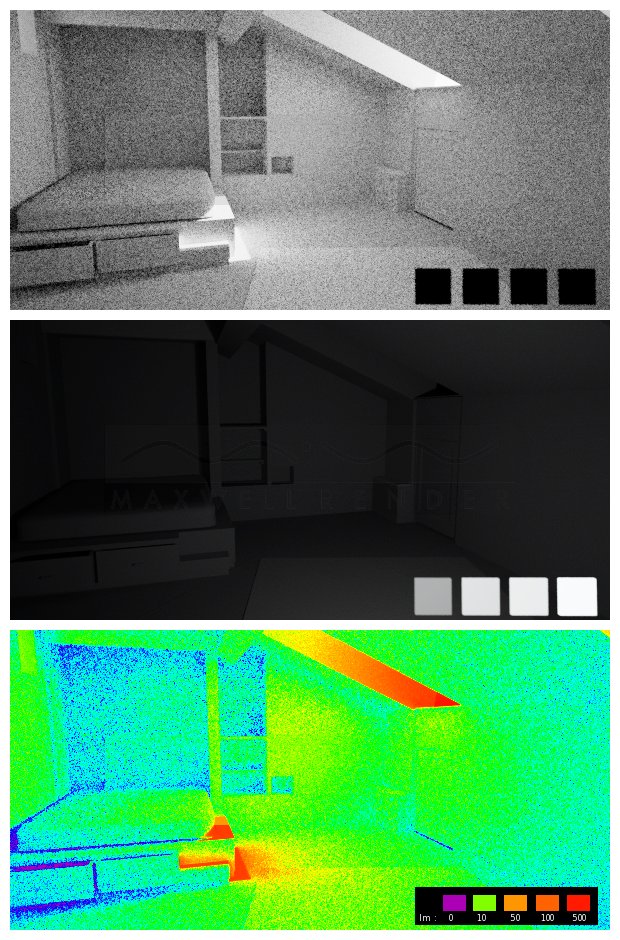
An idea for approximation:
1. clayrender (burn = 0)
2. lumens scale (10, 50, 100, 500 lm emiters) - same camera parameters
3. gradient map

Image

could be improved:
- is lumen the correct unity ?
- better scale
- replace multiple emiters with one mxi
- hdr image

sorry for artefacts, noisy render and had to gimp-out MR logo (1.7 vs 2.0 demo licence mismatch)

victor
User avatar
By osuire
#317977
Hi Victor,

How did you do the gradient map ?
Yes Lumen is the unit that I want to use since it is a measure of the power of light perceived by the human eye (cf Wikipedia).
The goal being to detect possible sources of glare, or under-lit zones in a building sheltering sports activities.

Cheers,

--
Olivier
By tokiop
#317981
Hello Olivier,

Gradient map in Gimp : Color > Map > Map Gradient
In photoshop it must be in "image adjustment", but there is also a gradient map "adjustment layer" which is more usable.
It maps a custom gradient on the image's black->white gradient's values, here a rainbow gradient.

The clayrender test was more to see how much light fall on the surface, if you need to better show glare (light source reflection in the sport player's eyes?) you might test making your materials 100% black and keeping only their respective glossiness/reflection values (or use specular layer output if it is working in MR2?).. hdr help to have a wider scale of light-values.

If you have a lumen limit that is ok for the sportmen, maybe just put an emiter of this value in your scene, and in the output image colorize any pixel that has higher value than the emitter's value.
By tokiop
#317983
Also I think human eye is very sensible and powerfull in "contrast adjustment", so the "glare in the eye" will depend of the ambiant light, and eye accomodation. To better view local contrasts in an image, you can use a "High Pass" filter, it will show for a given radius the variation in luminosity.
Maxwell Rhino 5.2.6.8 plugin with macOS Tahoe 26

Grazie Ferdinando, prima di aggiornare il Tahoe 26[…]