

- Tue Nov 25, 2008 1:16 pm
#285937
Hi all,
I have had this problem before, trying to simulate the same carpet.
The texutre is about 512x512 greyscale, you can see the dummy in the screenshot mesh for the UVW coords in 3DS Max.
I'm just wondering where the moire pattern is coming from, and why it seems to be following the form of the sub-d mesh.
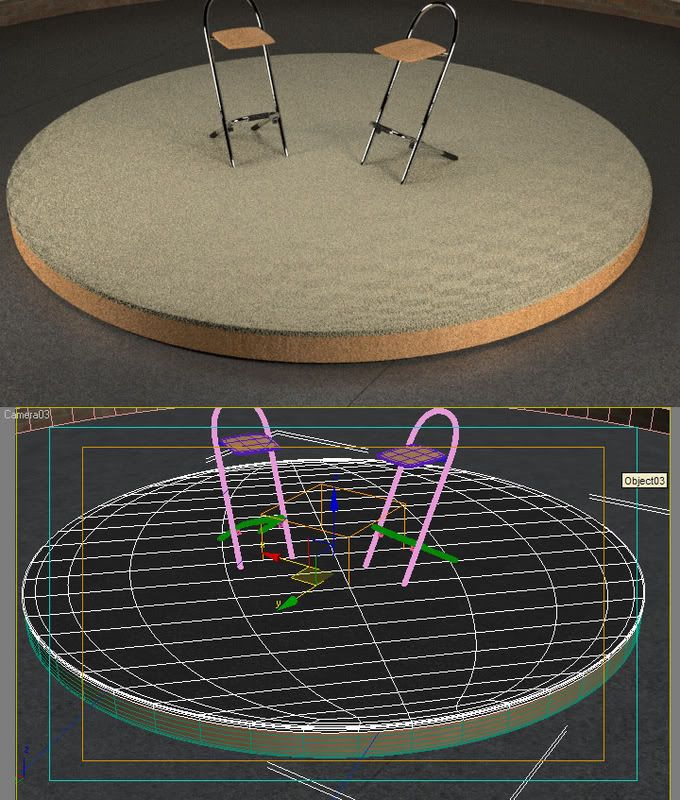
Does anyone have a solution to this, like a better way to mesh? Should it be made from squares of the same size as much as possible... but surely it will still pinch at the edges?
Thanks
Dave
I have had this problem before, trying to simulate the same carpet.
The texutre is about 512x512 greyscale, you can see the dummy in the screenshot mesh for the UVW coords in 3DS Max.
I'm just wondering where the moire pattern is coming from, and why it seems to be following the form of the sub-d mesh.
Does anyone have a solution to this, like a better way to mesh? Should it be made from squares of the same size as much as possible... but surely it will still pinch at the edges?
Thanks
Dave


 - By Matteo Villa