Not there yet? Post your work in progress here to receive feedback from the users.
User avatar
By simmsimaging
#237295
Looking cool so far Becco. The motion blur on the last one looks very good to me (they aren't moving crazy fast, but it looks quite realistic). You must be using 1.1 or something - isn't that disabled in 1.5?

b
By Becco_UK
#237299
d7mcfc: Thank you. The bomb bay was one of the first bits added to the Lancaster. Each bomb is a seperate object and if I get time when the model is finished I hope to recreate a nice bomb falling render - 'Rainmaker' style!

simmsimaging: Thank you. The motion blur was rendered with Maxwell 1.5 and set up with the Cinema4D plugin. The problem with Maxwells' motion blur is that it can't handle objects with high rotational speed. I tried some time ago with a dummy propeller - set up an accurate rpm and Maxwell rendered a blurred triangular shape. Then again, Cinema4D couldn't handle the high speed rotation either!
User avatar
By simmsimaging
#237346
The motion blur was rendered with Maxwell 1.5 and set up with the Cinema4D plugin
Cool - it must still be enabled in the C4D plugin. In the Max plugin it's locked out so I thought that was a 1.5 thing, not just Max.

b
By Becco_UK
#237586
Image

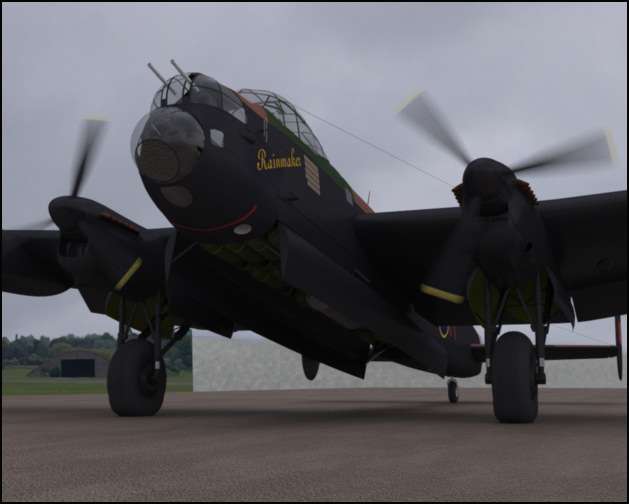
The 'Rainmaker' goes black! I used this in progress render to try out a black material which will have the texture maps slotted in - this attempt looks too reflective so that will be toned down. The tail and rudder parts have been painted and also the tyre gets its base coat of colour and a test 'rubber' material.

Since the last update the engine cowlings have had some small modifications and the undercarriage got completed. The wing flaps have been split from the main wing mesh with the moving cowl part attached to the inner flap.
By Becco_UK
#238108
Image

In preperation for painting the fuselage I've used polygon selection tags and connected the parts into a single object. A UV map was made using Maxons' Bodypaint.
Last edited by Becco_UK on Thu Jul 19, 2007 10:02 am, edited 1 time in total.
By Becco_UK
#238109
Image

The fuselage gets simple a paint job with some decals made in Paint Shop Pro. The over saturated colours will be sorted as part of the weathering process.

Used this preview to see what an interior green material applied to the canopy inner framework looked like.
By Becco_UK
#238414
Image

This latest preview sees the painted Rainmaker fuseselage back with the rest of the model. The green and brown camoflage colours have been desaturated a little. The weathering is to be done when all the models exterior painting is complete - this just involves the wings, engines and unrcarriage assemblies.

The wings are getting the attention at present with more substantial flaps made and the bit of the wing they go into added - I call it the flap bay but I'm sure there is a correct term!

The tyres have a Cinema 'bulge' deformer added to them and turned on for this preview. Using a bulge deformer is the reason I opted for smooth tyres instead of treads - I originally modelled a treaded tyre but with the bulge switched on the tyres displayed their modest polygon count and did not distort correctly. Subdividing the tyres was an unnacceptable solution for this model due a big increase in the polygon count.

Thank you for your continued interest in this modest project.
Last edited by Becco_UK on Sat Jul 21, 2007 7:34 pm, edited 1 time in total.
User avatar
By ivox3
#238423
Nice blur ! how'd you do that ..... :lol:
By Becco_UK
#238426
ivox3: Thanks. The blur applied to the propellers was done by first key framing a couple of frames in Cinema4D - each prop' has a 15 degree rotation, so that that sorted the movement out. Then to get that motion transferred to Maxwell it involved nothing more than applying a 'motion' tag to the propellers and turning on motion blur in Cinemas render settings. I set up two frames as an animation sequence to be rendered and it worked fairly good.

Although not seen in the latest preview, I like how Maxwell also takes into account motion blur with shadows - they get a realistic effect too. The bit I don't like is that Maxwell can't do rotational blur - look at the edges of the prop blades - there should be a curve! For a proper render I suppose that is easily sorted out with a little post work.
By Becco_UK
#238565
Image

I got around to painting the undercarriage using Bodypaint - a simple job with a mud texture sprayed on a seperate layer over the night black base layer. Used an ordinary soft edged round brush for this with a jitter setting applied. Then just a bit of smearing of the mud layer and lowered its opacity until I got the effect I was after - something that represents dried dirty rainwater thrown up by those massive wheels.

The dummy 'runway' uses a simple tiled material with a normal map helping it along.

In one of the final Rainmaker' renders I intend to use a personal photo' of an old, grass covered maintenance hangar - so this preview is seeing how good, or otherwise, the photo' resource applied as a simple Maxwell clipmap is likely to blend in.

The weather changed! As the exterior of the 'Rainmaker' gets closer to completion I've started to try hdr image based lighting - it renders almost twice faster than using Maxwells' sun and physical sky.
By Becco_UK
#238958
Image

Painting the 'Rainmaker' wings including adding some panel lines seemed to take forever. This preview is how the base layer turned out. They look sort of boring but I expect when the typical Lancaster exhaust smoke staining is added they might liven up a little. Rendered this time using a brighter HDR image.
By Becco_UK
#239412
Image

With the 'Rainmakers'' exterior base painting complete this preview shows the weathering getting underway. I've reduced the saturation of all the colours and used a smeared smoke texture for the wing staining. Not really noticable but a fine cracked paint texture was applied as a multiply layer to all the models' textures and its opacity lowered to 8%.
By Becco_UK
#240194
Image

Bubbaloo: Thanks.

A small update with a fairly basic interior added to the front of the 'Raimaker' which extends back to the astro dome glass - it's all a plain zinc primate colour yet until I sort out a UV map. I used this preview to try a different HDR image for the scene lighting.

So, is this a known issue?