#58027
... is possible per CubeCross format (HDRShop).

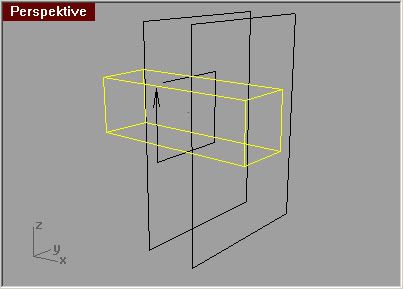
In my test I have take three surfaces (3:4 size). One surface I have rebuild and fold to a tunnel with cube cross section. The two other surfaces intersect this tunnel so that a cube volume is builded with the right part of the HDRI views at the sides. Than all surfaces are meshed with "simple plane" option.
User avatar
By 3dtrialpractice
#59950
interewsting, a 6 sided cube (6 walls around your subject), with a extra face for the top?
I would like to see a wire, so I can follow your process, I dont know what you mean my rebuiid and fold into tunnel?

very interested to see your setup, yes becasue the way I aprache dit wiht a low poly sphere causes distortion, I was going to jsut alpha it and composite a sphericalbackground, but your method sounds like it fixes the distortion issue.

please show a wire, and would be great to see a render too!
thanks for posting a distortionless solution :D

-Luke
User avatar
By Micha
#59955
Here a wire frame image. It is not so easy to see, how I fold the yellow tunnel, but I draw an arrow for better understanding. You could use 6 single planes too, but I like to use less objects in the scene. So, I must assign the MXI emitter on two objects only.

If you build a cube cross environment image in HDRShop, you will see too, what I have done. The verical bar of the cross is the tunnel.

Sorry, I have not done a serious rendering with this environment, only some quick tests - all deleted.

Image
User avatar
By 3dtrialpractice
#59957
ok, the wire totaly triped me out, hehe, totally different then i expected, BUT, I think It gives me your idea. And Ill too go into hdrShop and creat a cross cube of my sphereical hdri's and follow your suggestions.
Hope to have renders soon for ya!

what about rendertimes for this, i know you just start testing, but does it seam faster?

can you post another wire, maybe showing where the maxwell camera is?
Is the camera the small dot inside your cube there?

-Luke
OutDoor Scenery Question

you said: After you apply the image to the polygo[…]

fixed! thank you - customer support! -Ed