Page 1 of 1
Pool Shadows?
Posted: Wed Jul 21, 2010 7:44 pm
by Asmithey
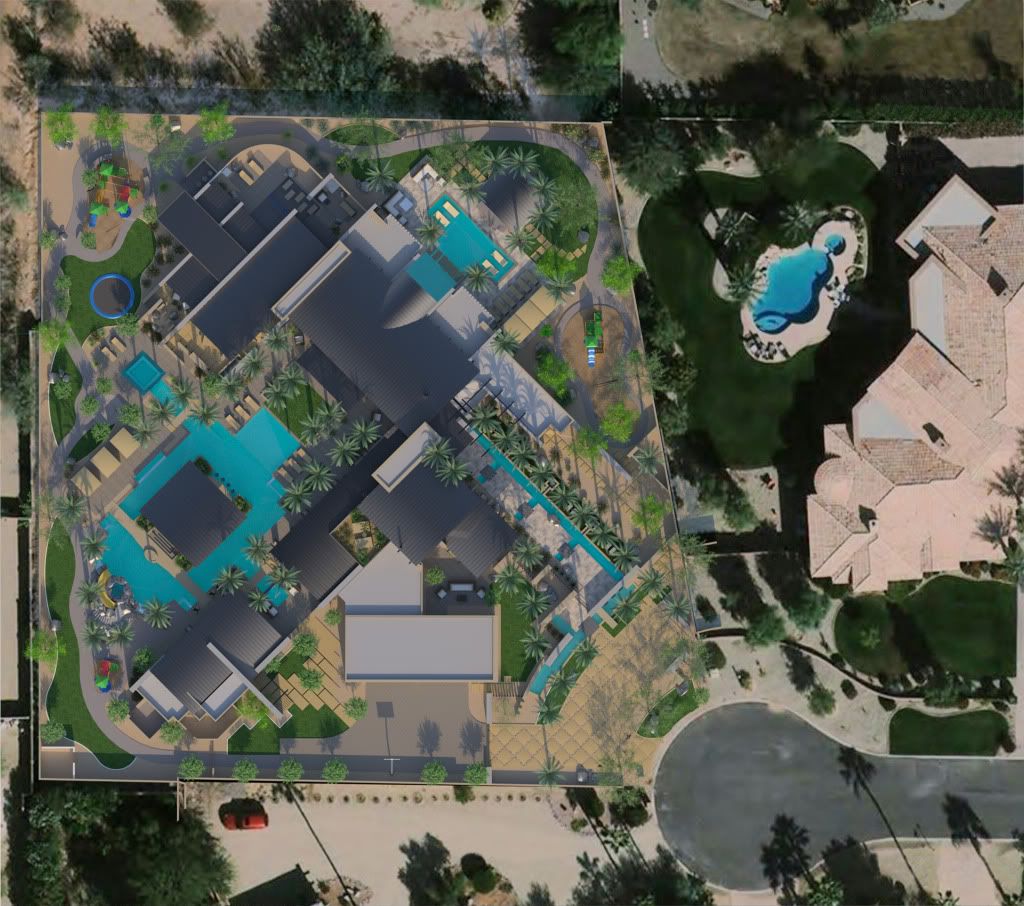
I was wondering. I did a site rendering of a project, see image. In the upper right of the image, as part of the aerial photo, is an existing pool. You can see the shadows of the pool walls casting on the bottom of the pool. Now in my rendered pools, you do not see the shadows. The water is just clear, white with a blueish-green pool bottom. It must be my material but not sure why. It is just a clear water material. I can post the material if someone wants to look at this.
Any ideas why my shadows do not show up at the bottom of my pool.
I know, my shadows do not match the image. I will fix this.
Thanks for any ideas.
edit: Could the attenuation distance not being set high enough cause this. I am thinking so. I will increase the attenuation.
Re: Pool Shadows?
Posted: Wed Jul 21, 2010 10:38 pm
by tom
Have you checked the shadows with hiding the water geometry?
Re: Pool Shadows?
Posted: Wed Jul 21, 2010 10:47 pm
by Bubbaloo
Try AGS?
Re: Pool Shadows?
Posted: Thu Jul 22, 2010 12:17 am
by Asmithey
Hi there,
Nope. I will render without the water see how it looks. Then try AGS and report back. Thanks for the tips.
Aaron
Re: Pool Shadows?
Posted: Thu Jul 22, 2010 10:09 am
by Fernando Tella
In this case I would just hide water to GI. That would give you completely clear water and superfast. In a more natural perspective it would be maybe too clear so I would add AGS hidden to camera to obscure it a bit and give a caustics effect but I don't think it's needed in this case.
Check this post to learn more about this method:
http://www.maxwellrender.com/forum/view ... s&start=30
(I have just noticed that animated PNGs doesn't animate in Chrome,

)
Re: Pool Shadows?
Posted: Thu Jul 22, 2010 12:52 pm
by Half Life
I see shadows -- they are just very faint... probably need to lower the reflectance color value/saturation to a more realistic level (lower than 225)
Best,
Jason.
Re: Pool Shadows?
Posted: Thu Jul 22, 2010 12:56 pm
by Fernando Tella
He's trying to see sun through a dielectric. It will show but at really high SL.
Using AGS will make shadows appear sooner but without refraction. Hidding water to GI will be faster and will show refracted shadows.
Re: Pool Shadows?
Posted: Thu Jul 22, 2010 1:30 pm
by Half Life
I gotcha on those issues -- I'm saying the materials are are limiting this to a certain degree. Here's a photo I worked over real quick to get the exposure/colors to a similar place... the shadows are there already, they are just less visible due to what I think are a overly high reflectance value on the pool bottom material.

If it was an attenuation issue it should go darker not lighter (less light penetrating)...
Best,
Jason.
Re: Pool Shadows?
Posted: Thu Jul 22, 2010 1:38 pm
by Fernando Tella
Yep, they show some kind of ambience soft shadows, but not the hard ones that sun should produce.
Re: Pool Shadows?
Posted: Thu Jul 22, 2010 4:31 pm
by Asmithey
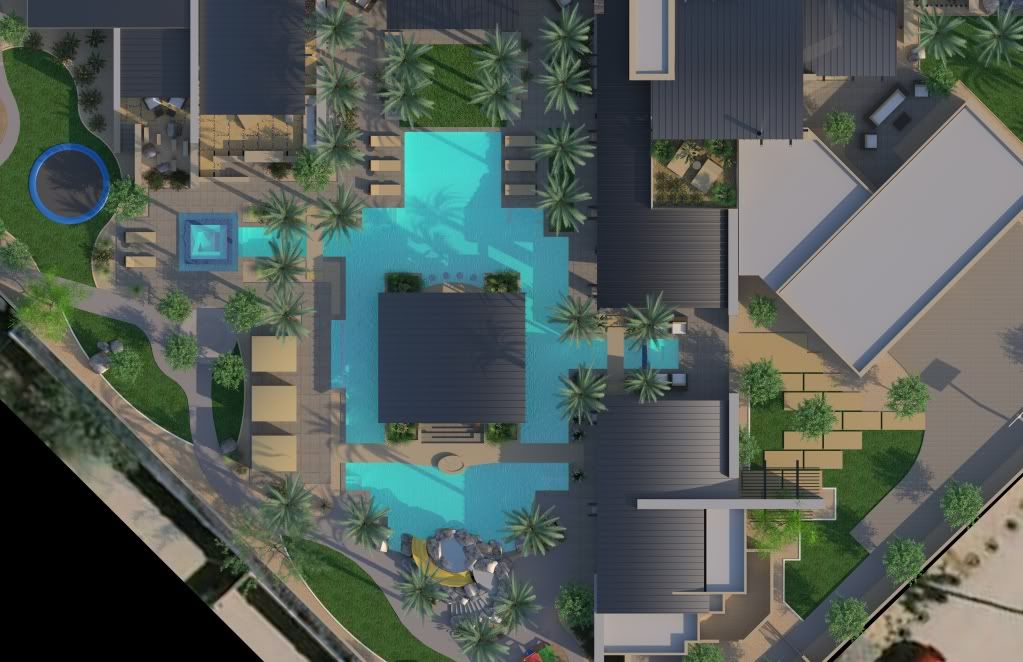
Here is the pool rendered with AGS. I also tried it with water created from the wizard but it looked just like the original image. You could not see the shadows.
Aaron
Re: Pool Shadows?
Posted: Thu Jul 22, 2010 5:11 pm
by tom
The reflectance color of tiles looks a bit excessive maybe...
Re: Pool Shadows?
Posted: Thu Jul 22, 2010 8:32 pm
by Asmithey
Yes. They look a bit plastic like instead of concrete like.
Thanks for pionting that out. I will fix it.
Aaron