All posts related to V2
User avatar
By chromecity
#326687
Hi folks. I was so psyched to have several M~R v.2 licenses now, but unfortunately that excitement phase was very short-lived. I have lost the majority of the work from the rendering sessions I have done in the past few days due to multiple crashes of the mxnetwork.exe, apparently resulting from a crash in QtCore4.dll. The DLL claims to be version 4.5.1.0 if that matters. I have reinstalled M~R to no avail - the crashes keep on coming. :roll:

When I have set up a net render, if I dare press the Preview button (the only mechanism I'm aware of thus far that actually triggers an interim save of both MXI file and output image) the Maxwell Manager just crashes and so I get no image and no interim MXI file. Just a complete waste of time and CPU power. Any ideas how to fix or avoid this? And is there any way to get the M~R net render to automatically dump out images and interim MXI files at a preset time interval? It seems such a shame to have to lose all the work just because it never decided to save anything and then crashes 10 hours into a rendering session.

I'm typically running two i7 computers w/ 12GB on Windows 7 Ultimate (64-bit) and have occasionally added in a quad-core Vista Ultimate (32-bit) system as well. But it crashes even with just the i7 systems, so it's not the fault of the 32-bit system.

BTW, once the Maxwell Manager crashes, is there any way to get it to restart and reconnect to the nodes which are still rendering? The Maxwell Monitor shows the job(s) still in progress and the render nodes hard at work still, crunching pixels. So are those guys all just marooned forever, or can they reconnect to a resurrected Maxwell Manager somehow? Thanks.

Regards,

Jeff Andrews
Chrome City Studios / FX Models
Last edited by chromecity on Sat Jul 17, 2010 4:35 pm, edited 1 time in total.
User avatar
By polynurb
#326839
hi Jeff

it could be related to ram running out on the machine running the manager.

i have trouble with netrender too, but only with cuing jobs.. once they render it is fine, and my manager only crashes if the machine it is running on runs out of ram.

> when you preview basically the same thing happens as when a job finishes.. the manager merges all the temp .mxi files (btw. you can retrieve them manually on each node in the Temp/mxmnetwork folder) and it takes a lot of ram.. so if you are also rendering in the background you might hit the limit even with 12GB, depending on your scene and resolution and Multilight on/off...

for debugging try netrendering with only 2 machines (32&64bit) and leave a second i7 purely for the manager...


daniel
User avatar
By Asmithey
#326842
My manager crashes every time I hit preview but only when doing coop renders. So what I have been doing is just using different cpu-ids then manually merging the files just to avoid the annoyance of the manager crashing all the time. I know the renderings are still going when it crashes but it drives me nuts. If I have to manually merge them in the end anyway I might as well render them in non coop mode. At least I get to see the previews.
User avatar
By chromecity
#327012
Thanks for the replies, folks. I would have replied sooner if the forum had actually notified me about the posted replies like I was expecting, but alas, nothing (and it's a special email address for NextLimit which has never had any issue getting through spam filters before.

Since a couple of you who replied also experience the same manager crashes, it seems like a pretty real issue. Given what you've said, it looks like I need to keep an eye on my memory (and I thought 12GB per system would be enough - hah, silly me). This was a fairly dense scene so perhaps that also may have had something to do with it. And maybe the reason Bubbaloo didn't have any issue is because of his 16GB RAM vs. my 12GB RAM. Too bad that 4GB modules cost so darn much compared to 2GB modules... :?
User avatar
By chromecity
#327019
Looks like the new version 2.1 may be a huge improvement. :D

From the listing of network bugs fixed:
• Memory consumption in the manager has been dramatically reduced.
• Fixed: potential crash rendering scenes larger than 2Gb.
• Fixed: potential crash when the MXI generated by the render engine was larger than 2Gb.
• Jobs/Nodes lists keep the columns width properly between sessions.
• Fixed: simulens was not applied after finishing a job.
• Fixed: final SL displayed after stopping a cooperative render was not good (it was just a display issue).
• Fixed: potential crash when closing the manager.
• “reset” nodes routines improved.
• “send textures” has been renamed to “send dependencies”. This is not a minor change but it means that now when this option is enabled all the job dependencies (MXS file, MXI to resume, textures, ior files, etc.) are sent from the monitor to the render nodes. This option is faster and has several advantages (it is enabled by default), but it requires that the monitor who submitted the job is alive until the job starts. When “send dependencies” is disabled the MXS file and all the dependencies must be located in network paths accessible from manager and render nodes. This option is slower but it can be useful when the user wants to switch off the monitor that submitted the job or when the user has a fast repository server for textures/scenes.
• Fixed: bug parsing extra command line options contained in the “command line” GUI field.
• Job wizard GUI improved.

Excellent! :D
User avatar
By Asmithey
#327098
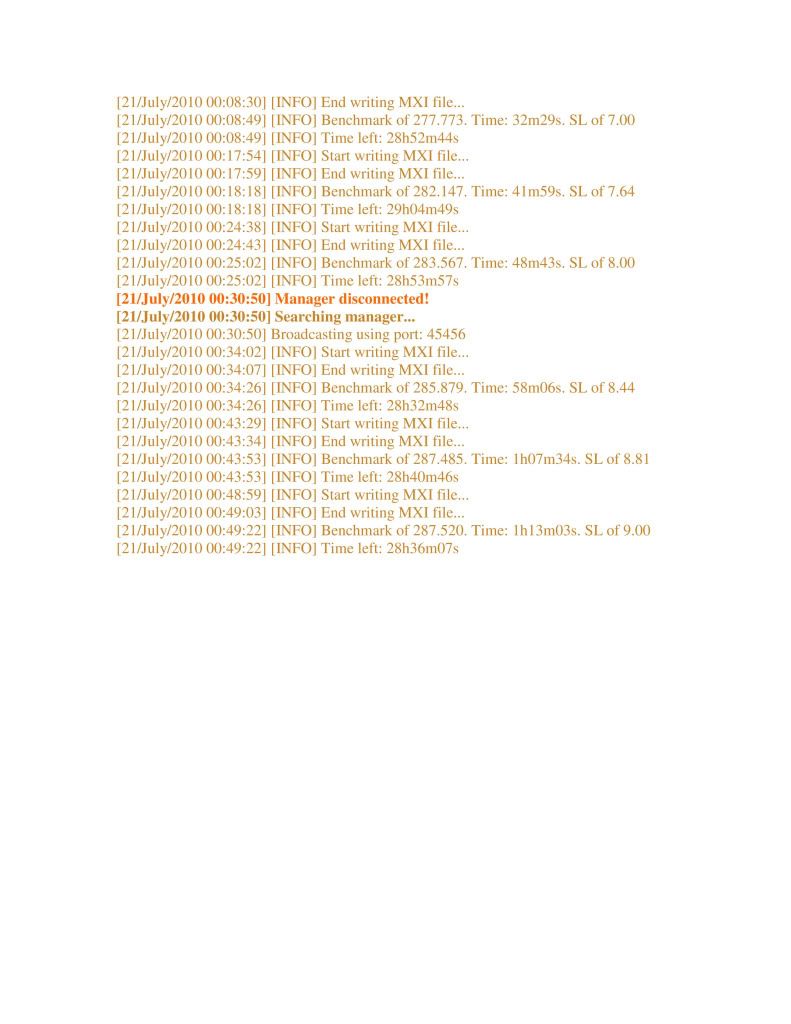
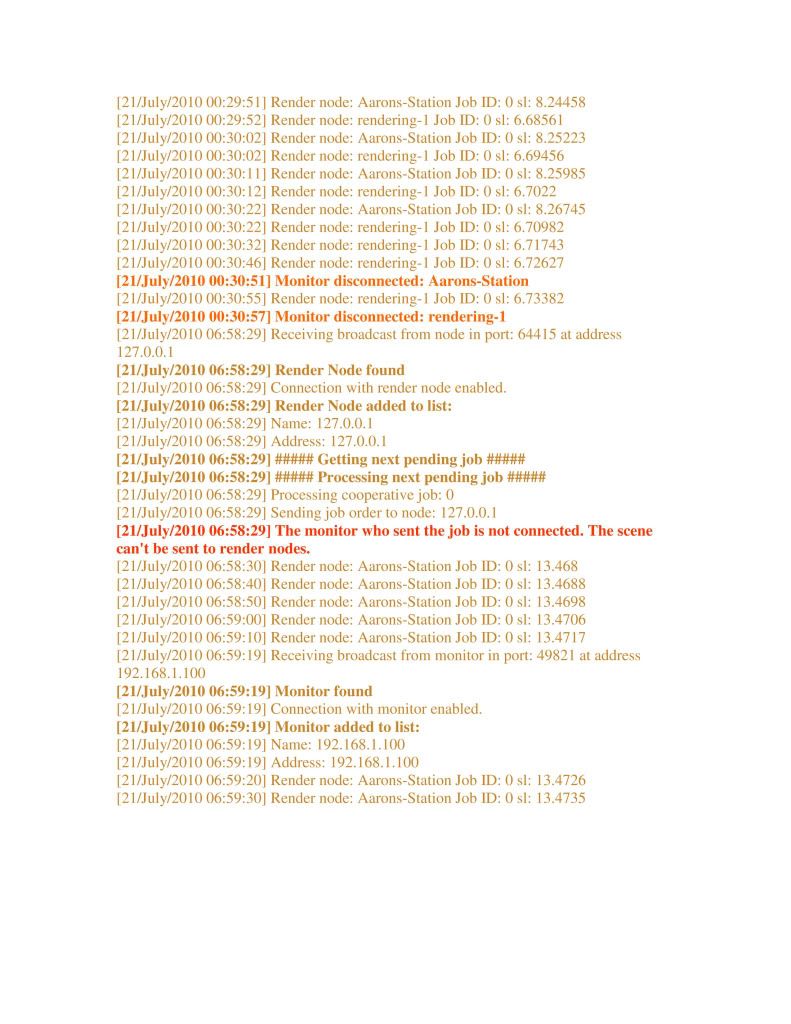
I have downloaded and installed the latest version of Maxwell and the Form-Z plug-in. I ran a coop and here is what happened, see images of manager and node below. I still can't run a successful coop. Not sure why the manager still is getting disconnected. I never clicked preview either, so that is not it.

If you see below, it shows the monitor reconecting but only processing the information of one node in the monitor. The other node is still rendering, which is great, but I wish I did not have to always manually merge my files. If I had a larger network, this would be frustrating. Anyway, I am not sure what is causing this.

I am not coming close to using up my ram on this job, so that is not it.

Could the computer going into sleep or hibernation mode cause this? It always seems to happen after I go to bed. Look at the times in the node dialogue. I turned my monitor just about the time it reestablished the connection 6:58am. May be coincidence Not sure.


Any helpful insight appreciated.

Image

Image
By Gary
#327135
I also have had a few random crashes of the Network manager with V2.1. Have only been doing cooperative rendering.

I have switched over to debug mode and will report back if problems persist.

Gary
User avatar
By dariolanza
#327523
Hi,

Finally we've being able to isolate and fix this manager crashing problem.

The problem appears when merging an render, specially when the shadow channel is on.

Fortunately we already have fixed version that will release as soon as possible.

Greetings

Dario Lanza
Maxwell Rhino 5.2.6.8 plugin with macOS Tahoe 26

Grazie Ferdinando, prima di aggiornare il Tahoe 26[…]