Page 1 of 1
Pillow with fringe?
Posted: Fri Nov 21, 2008 6:21 pm
by frosty_ramen
Hi all,
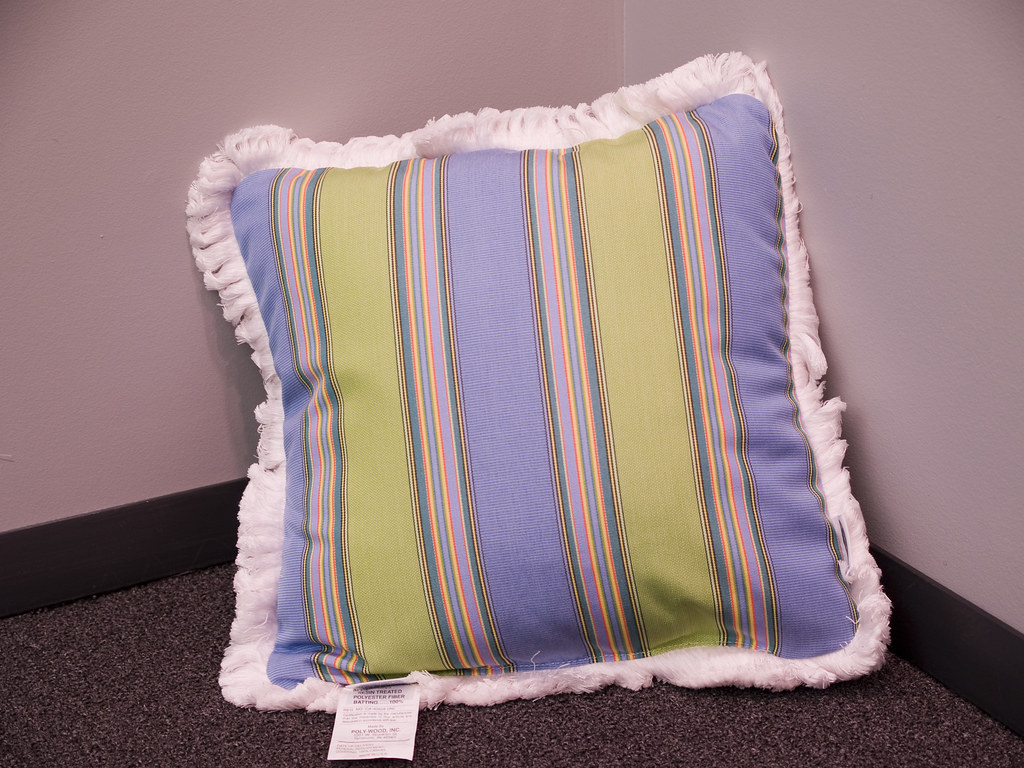
Just ran into an odd need, a pillow with fringe.
im not really sure how to go about making fringe on a pillow.
the only idea i had was add a plane to a pillow that would disect it and that plane would have a texture at 0, 90, 180, 270.
Anyone with a better idea, or made one in the past?
Here is the pillow with fringe that i have to replicate.
Thanks
Dan
Posted: Fri Nov 21, 2008 7:57 pm
by Mattia Sullini
Ouch! Good luck...
Posted: Fri Nov 21, 2008 10:27 pm
by Tea_Bag
Displacement might work?! or blender hair particles using weight painting? its a tricky one! Good luck
Posted: Fri Nov 21, 2008 10:35 pm
by Tea_Bag
Here you go this might help you!
 http://www.cgarchitect.com/resources/tu ... orial1.asp
Once your at that stage you could use a texture map for the fringe and clipmap it

mmm...might look abit flat!
Posted: Fri Nov 21, 2008 10:57 pm
by frosty_ramen
Mattia Thanks for the .... humm inspiration
- Tea_Bag, yeah thats atleast a starting point
dan
Posted: Fri Nov 21, 2008 10:58 pm
by Bubbaloo
Uh, good luck. Why not model every fiber?

Posted: Sat Nov 22, 2008 1:55 am
by KurtS
I think it could be done with clip-maps. have a look at this
MODO-example -
Posted: Sat Nov 22, 2008 12:36 pm
by Maximus3D
Isn't that some sorta long strands of thread or something like that, if so then use a hair/fur plugin or feature of your 3d modeling app and let it do the job for you, it should work beautifully for such a model. Clipmapping, displacement or any similar method might end up looking cheap and poor.
Atleast this is how i would approach such a problem..
/ Max
Posted: Sat Nov 22, 2008 5:25 pm
by polynurb
Bubbaloo wrote:Uh, good luck. Why not model every fiber?
very inspiring Bubbaloo..... I had to give it a go
was pumping cad all week long, so i was up for a little organic modelling...
this took about 20min, all done within Rhino, using array along curve, a random deselection script (free), box edit plugin and curve piping plugIn (both free) and a some cage editing.
with a little more time & love to details, the result could be decent...

Posted: Sat Nov 22, 2008 6:33 pm
by Bubbaloo
Not bad! I should be more careful with my "advice".
Posted: Sat Nov 22, 2008 10:30 pm
by Tea_Bag
Not bad at all polynurb considering the time it took!
Posted: Mon Nov 24, 2008 12:38 am
by mashium123
Yes, I guess it's doable... if a bit of time is invested in the settings and options it could come quite close, I'd guess.
Btw: this is c4d's hair module. Quite standard without too much indivdual efforts from my side.

Posted: Mon Nov 24, 2008 3:45 pm
by frosty_ramen
Thanks a lot guy's for the advice if i have a chance i'll make a go of it, but at this point they might just use a studio shot.
-Dan
Posted: Mon Nov 24, 2008 5:51 pm
by frosty_ramen