Page 1 of 1
problem with blocks and material
Posted: Wed Mar 04, 2009 2:10 am
by polynurb
hi Jd,
i am struggling with using blocks and i would like to ask you about the recommended workflow.
In my scene i have 10 blocks (types of trees) using two materials each, leaves and trunk.
I originally blocked the geometry in the main scene, exported the block and changed it to linked.
Now i am editing the blocks seperatly in a second rhino, changing materials and mapping. I only use channel 1 mappings and embedded materials.
when i save the block and update it in the main scene i see the right texture & mapping displayed but when i render it is completly wrong, totally distorted mapping.. so i can't even tell if it is only mapping or actual material causing the error.
when i explode the block .. it renders fine..any clue?
Posted: Wed Mar 04, 2009 12:35 pm
by JDHill
I've played with this, but I'm not sure if I'm doing the same thing you are. I am also not sure about what support for texture-mapping there is or isn't when using blocks. Since exploding them makes a difference, I'd suspect there's maybe an issue there.
I'm also not sure what you meant when you said 'blocked the geometry in the main scene, exported the block and changed it to linked'. Why would you be inserting a block as a block? Does it work any better if you:
- export the geometry to a file
- delete the geometry
- inserted the exported file as a block
Or am I missing something there? I think it would complicate things to have a nested block for no reason...but maybe there's a reason?
Posted: Wed Mar 04, 2009 1:27 pm
by polynurb
JDHill wrote:
- export the geometry to a file
- delete the geometry
- inserted the exported file as a block
that is basically what i did.. by "blocking" i meant:
selecting geometry & making it into a block, now this block only exists embedded in the rhino file (no external reference).
In block properties you can export current embedded blocks to file (this will be a normal rhino file/ no nested blocks).
This block i then change to "linked" so i notice when it updates and i can edit the file externally.
Then i go back to the main scene scatter the block around, also non uniformally scaling some of them ( projector gets scaled right, as i can see when i explode the scaled block)
for some reason it seems rhino needs much less ram when exporting blocks (instances off!) than when they are exploded.
I get random error messages exporting the scene as it is too big with all blocks exploded... exporting parts always works
Posted: Wed Mar 04, 2009 2:04 pm
by JDHill
I see, I never used the export function in the block manager before. It looks to be working funny here either way though. For example, I made two cubes and assigned some textured materials to them. I gave them both planar mappings and saved them as planar.3dm. I then changed the mappings to spherical and saved that as spherical.3dm. I then started a new file and inserted one of each of the previous as a linked block. But -- all the boxes are using planar mapping, even after exploding them, so apparently there's a basic issue regarding blocks vs. mappings.
Posted: Wed Mar 04, 2009 2:26 pm
by polynurb
that is bad news..
did you use channel 1 or default projector for that test?
this is what it looks like here:
on the trunk looks like two mappings fighting with each other..
strangely the leaves seem ok...???
(sorry for the cheap image..just grabbed out of the trashbox.. never meant to post it..)

Posted: Wed Mar 04, 2009 2:32 pm
by JDHill
Have you installed that non-official texture-unwrapping plugin that was posted on the Rhino newsgroup yesterday? I traced the issue here down to that; things (apparently) work fine if I don't load it. I'm not sure what I'm looking at in that image, what type of projection are you trying to use?
Posted: Wed Mar 04, 2009 2:46 pm
by polynurb
JDHill wrote:Have you installed that non-official texture-unwrapping plugin that was posted on the Rhino newsgroup yesterday? I traced the issue here down to that; things (apparently) work fine if I don't load it. I'm not sure what I'm looking at in that image, what type of projection are you trying to use?
hmm.. now things get complicated:
i did have a tool installed on the computer i originally created the scene (the one from the labs page), but now i am back at an older 32bit OS because hdd trouble... so no no unwrapping tool installed.. and i even gave load protection to rdk/rdk loader
btw. that is trying to be a box projector ~2x2x2m
Posted: Wed Mar 04, 2009 2:49 pm
by JDHill
That's what I thought...do you feel like emailing me one of those trees because it's working all right here with more traditional objects.
Posted: Wed Mar 04, 2009 3:20 pm
by polynurb
JDHill wrote:...do you feel like emailing me one of those trees
yep!

sent...
Posted: Wed Mar 04, 2009 5:54 pm
by JDHill
Well, the best mapping I can get on that mesh (the tree trunk) is to use a cylindrical projection (I have it set here to: pos 0,0,250, size 100,100,500). I am also not seeing any particular block-related issues at all with this geometry though, so I'm still not entirely sure what it is that you're seeing there (I tried to duplicate the scenario you described).
Posted: Wed Mar 04, 2009 7:16 pm
by polynurb
i see.. so the file with the block renders ok when you try it... very odd... can this be a materisl issue somehow... ?
Posted: Wed Mar 04, 2009 8:10 pm
by JDHill
What I did to test:
- made four copies of the source file (the one with the geometry)
- edited each one to use different materials
- scaled the tree differently in each file just to make them different
- block-inserted four copies (linked) of each of those files into a new master file
Here's how it renders:
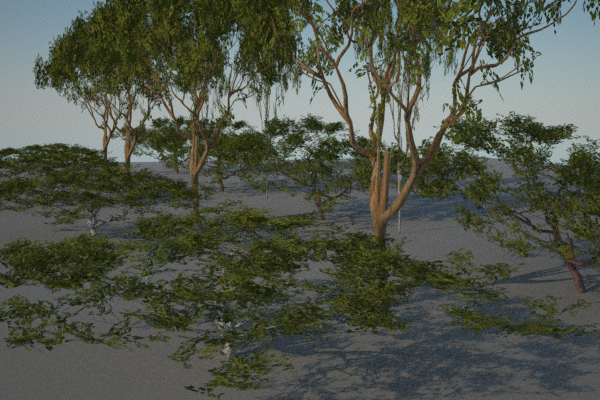
As I said before, cylindrical projection looks to work best here; for whatever reason, it doesn't look like surface mapping is working on these meshes, and box projection will give you bad artifacts like in the image you posted.